
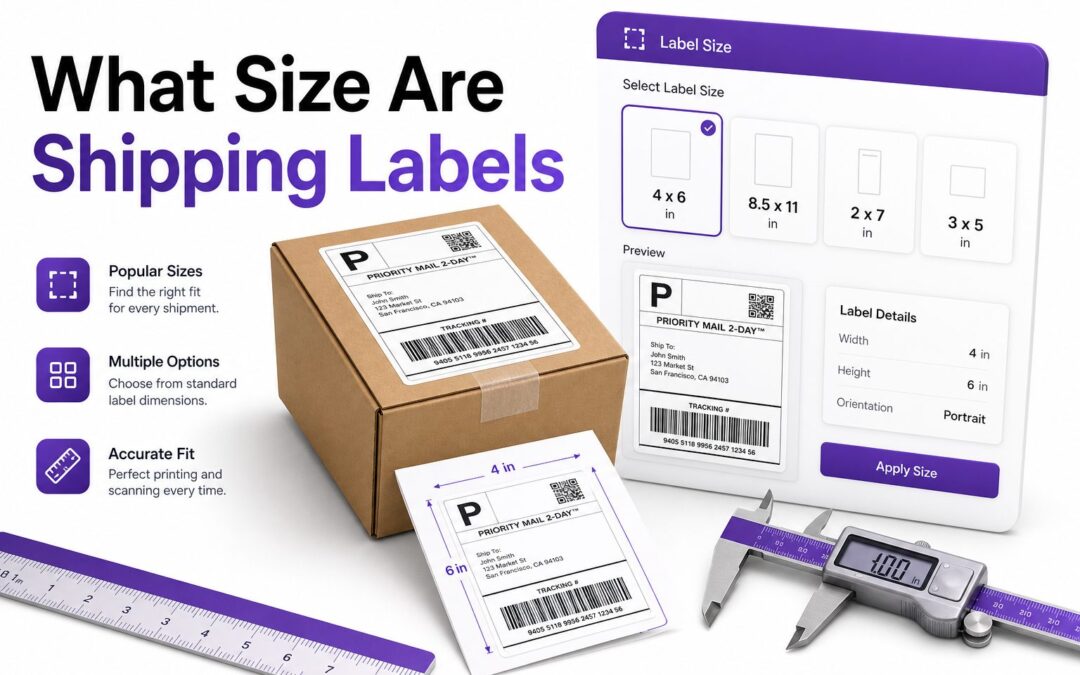
Shipping labels look simple until one prints too small, scans poorly, or gets rejected by a carrier. If you sell online, ship warehouse orders, or mail packages from home, label size affects speed, accuracy, and delivery reliability. The common question is what size are shipping labels, and the answer depends on the carrier, printer, package type, and label format.
Most shippers use standard sizes because carriers design their systems around readable barcodes, clear addresses, and consistent placement. A label that is too small can blur the barcode, while one that is too large may wrap around a box edge. Choosing the right size helps your package move through sorting machines without delays. This guide explains standard shipping label dimensions, carrier preferences, printer options, and practical sizing tips for real shipping workflows.
Standard Shipping Label Sizes
The most common shipping label size is 4 x 6 inches. This size is widely used by USPS, UPS, FedEx, DHL, ecommerce platforms, fulfillment centers, and thermal label printers. It provides enough room for barcodes, addresses, service details, tracking numbers, and carrier routing information.
Another common format is 8.5 x 11 inches, usually printed on standard letter paper. This layout often includes one full-page label or multiple labels per sheet. It works well for occasional shippers, but it usually requires tape or adhesive label sheets for package application.
Why 4 x 6 Inches Became the Standard
The 4 x 6 label became popular because it fits neatly on most boxes, padded mailers, poly mailers, and shipping tubes. It is large enough for barcode scanners yet compact enough to stay flat on the package surface without folding over edges.
Thermal printers also helped make this size the default. Most direct thermal shipping printers are built around 4-inch-wide rolls, making 4 x 6 labels fast, affordable, and easy to print without ink or toner.
Common Label Sizes by Shipping Carrier
USPS supports several label formats, including 4 x 6 inches and full-page 8.5 x 11 labels. Many USPS labels generated through Click-N-Ship, marketplace tools, or postage software can be printed in either format depending on the printer settings selected.
UPS and FedEx commonly use 4 x 6 labels for package shipping. Their systems are optimized for barcode clarity and consistent placement, especially in commercial and warehouse environments. DHL and regional carriers also tend to support 4 x 6 labels for parcel shipping.
Quick Size Reference
- 4 x 6 inches: Best for most parcel shipping and thermal printers.
- 8.5 x 11 inches: Best for standard home or office printers.
- 2 x 7 inches: Often used for narrow mailing or file labels.
- 3 x 5 inches: Sometimes used for smaller parcels or internal labels.
- 4 x 8 inches: Used when extra routing or customs information is needed.
Shipping Label Sizes for Ecommerce Sellers
Ecommerce sellers usually get the best results with 4 x 6 labels. Marketplaces such as Amazon, eBay, Etsy, Shopify, and Walmart Marketplace commonly support this format through their shipping tools. It keeps packing stations efficient and reduces trimming or taping time.
If you ship more than a few packages each week, a thermal printer and 4 x 6 labels can save meaningful time. The setup also reduces printing errors because the label output matches the format most carriers expect.
Thermal Printer Label Dimensions
Most thermal shipping printers use labels that are 4 inches wide and 6 inches long. These can come in rolls, fanfold stacks, or perforated sheets. The important factor is matching the printer’s supported width, sensor type, and label gap settings.
Some compact printers support smaller widths, but shipping labels should remain large enough for readable barcodes. Before buying labels, check the printer manual and carrier platform settings. A correct label size in software matters as much as the physical label stock.
Ecommerce Label Setup Checklist
- Select 4 x 6 inches in your shipping software.
- Match printer settings to the actual label size.
- Print one test label before shipping live orders.
- Confirm the barcode is sharp and not stretched.
- Keep the label flat on the largest package surface.
- Avoid placing tape over thermal-printed barcodes.
Shipping Labels for Home Printers
Home printers commonly use 8.5 x 11 inch paper or adhesive label sheets. This option is practical for low-volume shipping because it does not require a dedicated thermal printer. Many shipping platforms let users print one label per page or two labels per sheet.
The main drawback is application time. Plain paper labels must be cut and attached securely with clear packing tape. Adhesive half-sheet labels are cleaner and faster, but they still use ink or toner, which adds cost over time.
Half-Sheet Shipping Labels
Half-sheet labels are typically 8.5 x 5.5 inches, with two labels on one standard letter-size sheet. These are popular with home businesses because they work with regular inkjet and laser printers while reducing paper waste compared with full-page labels.
Although half-sheet labels are larger than 4 x 6 labels, they are generally accepted if the barcode prints clearly. The extra size can be useful on medium boxes, but it may feel oversized on small padded envelopes or narrow mailers.
Full-Page Shipping Labels
A full-page shipping label uses an entire 8.5 x 11 inch sheet. It is less common for small parcels but may appear when printing certain international forms, packing slips, or combined shipping documents. Some sellers fold the page to show only the label portion.
When using full-page labels, avoid wrapping barcode sections around corners. Sorting equipment needs a flat scan area. If the label is too large for the package, reprint in a smaller supported format rather than forcing it onto the box.
Home Printing Tips
- Use adhesive sheets instead of plain paper when possible.
- Choose laser labels for laser printers and inkjet labels for inkjet printers.
- Let ink dry fully before applying tape.
- Do not shrink labels below carrier recommendations.
- Use high print quality for barcodes and tracking numbers.
- Store labels flat to prevent curling and feeding issues.
Small Package and Envelope Label Sizes
Small packages can still use 4 x 6 labels if the label fits flat on one side. Many poly mailers and padded envelopes are designed with this size in mind. For very small mailers, the package itself may limit the usable label area.
If a 4 x 6 label does not fit cleanly, choose a larger mailer or use a carrier-approved smaller format. Never fold the barcode, tracking number, or address block. A folded barcode can cause sorting delays or manual processing.
Large Box Label Placement
Large boxes do not usually need larger labels. A standard 4 x 6 label works well as long as it is placed on the top or broadest side of the carton. The label should sit flat, away from seams, straps, corners, and heavy tape lines.
For oversized shipments, carriers may require additional handling labels, orientation arrows, or freight documents. These are separate from the main shipping label. The primary shipping label still needs a clear barcode and visible delivery address.
Barcode Readability and Label Scaling
Barcode readability is one of the biggest reasons label size matters. When labels are scaled down, barcodes become dense and harder for scanners to read. When labels are stretched, barcode proportions may distort, causing the same problem.
Always print labels at 100 percent scale unless the shipping platform provides a specific size adjustment. Printer dialogs sometimes default to “fit to page,” which can shrink a 4 x 6 label on letter paper. That small setting can create major scanning issues.
Package Size Comparison Table
Package Type | Recommended Label Size | Best Printer Option | Key Note
Small padded mailer | 4 x 6 inches if flat | Thermal printer | Use a larger mailer if the label folds
Poly mailer | 4 x 6 inches | Thermal printer | Smooth the surface before applying
Medium box | 4 x 6 inches | Thermal or laser | Place on the broadest flat side
Large box | 4 x 6 inches | Thermal printer | Add extra handling labels separately
Occasional home shipment | 8.5 x 11 or half-sheet | Inkjet or laser | Avoid shrinking the barcode
International Shipping Label Sizes
International shipping may require more documentation than domestic shipping. A 4 x 6 label may still be used for the main postage label, but customs forms, commercial invoices, or declaration pages can add extra printed materials.
Some carriers combine customs data into a single shipping label, while others require multiple pages. The right size depends on the service and destination country. Always follow the label format generated by the carrier or shipping software.
Customs Forms and Document Pouches
Customs documents are often printed on letter-size paper and placed in a clear adhesive pouch. The main shipping label should remain visible on the package, while supporting documents stay accessible for inspection during transit.
For international sellers, it is helpful to keep both 4 x 6 thermal labels and letter-size paper available. That setup covers standard parcel labels and extra customs paperwork without forcing one format to do everything.
Marketplace and Platform Label Settings
Marketplace shipping tools usually let sellers select label format before printing. Shopify, Etsy, eBay, and similar platforms often provide 4 x 6 thermal labels and 8.5 x 11 desktop printer options. Choosing the wrong format can waste labels or create unreadable output.
If labels print sideways, too small, or split across pages, the issue is often a mismatch between platform settings and printer settings. Set both to the same dimensions, then run a test print before processing a full batch.
For more ecommerce shipping setup advice, see [Internal Link: Ecommerce Shipping Labels].
Practical Platform Tips
- Save 4 x 6 inches as your default label format.
- Use browser print preview before printing batches.
- Disable automatic page scaling in printer settings.
- Keep carrier labels separate from packing slips.
- Recheck settings after changing printers or browsers.
- Print sample labels when updating shipping software.
Shipping Label Materials and Adhesives
Shipping label size is only part of the decision. Material also matters. Direct thermal labels are common for ecommerce shipping because they print quickly without ink. However, they can darken with heat, sunlight, or certain chemicals, so storage matters.
Inkjet and laser labels use different coatings. Inkjet labels absorb liquid ink, while laser labels handle heat from toner fusion. Using the wrong type can cause smearing, poor adhesion, printer jams, or curled labels that do not stay flat on packages.
Weather and Handling Considerations
Packages may face rain, humidity, heat, cold, conveyor belts, and repeated handling. A label should stay attached and readable from pickup to delivery. For moisture-prone shipments, strong adhesive and protective placement are more important than increasing label size.
Clear packing tape can protect plain paper labels, but avoid heavy glare and wrinkles over barcodes. Thermal labels generally should not be covered with tape unless the tape is known to be thermal-safe, because some adhesives can affect print quality.
Mistakes to Avoid When Sizing Shipping Labels
One common mistake is shrinking a label to fit a small package. This can make barcodes unreadable and addresses hard to verify. A better fix is choosing packaging that fits the standard label, especially for carrier-generated parcel shipments.
Another mistake is placing labels over box seams or curved surfaces. Even a correctly sized label can fail if it bends, wrinkles, or lifts. The best label size still needs proper placement and clean package preparation.
Label Quality Control Tips
- Print at 100 percent scale.
- Check barcode sharpness before applying labels.
- Replace low-quality label rolls that smear or fade.
- Clean thermal printer heads regularly.
- Avoid wrinkled, dusty, or wet package surfaces.
- Keep labels away from corners and box openings.
How to Choose the Right Shipping Label Size
Start with your shipping volume and printer type. If you ship regularly, 4 x 6 thermal labels are usually the most efficient choice. If you ship occasionally, letter-size adhesive sheets or plain paper labels can work without extra equipment.
Next, consider packaging. Your label must fit flat, remain readable, and leave no barcode wrapped around an edge. When packaging is too small for a carrier label, it is usually wiser to change the mailer than to resize the label.
Cost and Workflow Considerations
Thermal labels have an upfront printer cost, but they lower ongoing expenses by removing ink and toner from the process. They also speed up packing because labels peel and apply quickly. For sellers with daily shipments, the time savings add up.
For low-volume users, a home printer may be more practical. The per-label cost is higher, but there is no separate printer to buy. The right answer depends on order volume, workspace setup, and how often labels are printed.
Shipping Label Best Practices
A correctly sized label should be printed clearly, placed flat, and protected from damage. The shipping address, return address, tracking number, and barcode all need to remain visible. If any of those elements are cut off, reprint the label.
Keep a simple label station with your printer, label stock, scale, tape, and packaging supplies in one place. This reduces errors and makes it easier to process orders consistently. For related packing workflows, visit [Internal Link: Package Shipping Tips].
Best Practices List
- Use 4 x 6 inches for most parcel shipments.
- Choose 8.5 x 11 inches only when using standard printers.
- Match software, printer, and label stock dimensions.
- Keep barcodes flat and free from wrinkles.
- Reprint labels with faded, blurry, or clipped text.
- Confirm carrier-specific rules for unusual shipments.
Conclusion
Choosing the right label size is a small detail that has a direct impact on shipping accuracy. For most domestic parcels, 4 x 6 inches is the standard because it works well with major carriers, thermal printers, ecommerce platforms, and common packaging types. Letter-size and half-sheet labels remain useful for home printers and occasional shipments, especially when adhesive sheets are available.
The best approach is to match your label format to your printer, carrier, and package size while protecting barcode readability. Avoid shrinking labels, folding barcodes, or placing labels across seams. If you have ever wondered what size are shipping labels, the practical answer is simple: use 4 x 6 inches for most packages, and use letter-size formats only when your printing setup requires them.
FAQ
What is the standard shipping label size?
The standard shipping label size is 4 x 6 inches. It is widely used by USPS, UPS, FedEx, DHL, ecommerce platforms, and thermal printers because it gives barcodes and address details enough room to print clearly.
Can I print shipping labels on regular paper?
Yes, shipping labels can be printed on regular 8.5 x 11 inch paper. You will need to cut the label and attach it securely with clear packing tape, keeping tape smooth over the label area.
Are 4 x 6 labels accepted by USPS?
Yes, USPS accepts 4 x 6 shipping labels for many parcel services. This size is common when printing through online postage platforms, marketplaces, thermal printers, and USPS-compatible shipping software.
Can a shipping label be too small?
Yes, a shipping label can be too small if the barcode, address, or tracking number becomes difficult to read. Shrinking labels may cause scanner problems, sorting delays, or manual carrier handling.
Do thermal printers need special labels?
Yes, direct thermal printers need thermal label stock designed for heat-based printing. Standard paper labels will not work properly in direct thermal printers and may cause blank labels, poor output, or printer feeding issues.